Refunds on Game Currency Orders: How the Guarantee Works
The refund rule on this store is one sentence long: if an order is not delivered or cannot be used, you receive a full refund. What turns that sentence into something usable is knowing which failures it covers, and which details in the order form prevent most of them — a Genshin Impact order runs in a published window of 5–30 minutes, and the most common failure is a session left open while it runs.
Key takeaways
- The published wording is narrow and clear: not delivered, or not usable, means a full refund.
- Order status stays visible in the Order Record, and a confirmation email arrives on completion.
- Live chat is staffed by a real person 24/7, before and after the purchase.
- Genshin Impact orders need a HoYoverse Account login and one of four servers: America, Europe, Asia or TW-HK-MO.
What the published guarantee actually says
Read the sentence slowly, because both halves carry weight. "Not delivered" covers the case where the order never completes. "Cannot be used" covers the case where something arrives but does not work for your account. In either situation the published outcome is a full refund of what you paid. The Arknights: Endfield page repeats the same idea in its own words, stating that if an order is not delivered or the items cannot be used, KeyGold refunds it in full.
Just as important is what the wording does not say. It does not describe a timeline for the refund, it does not promise an outcome in any scenario outside those two, and it does not turn a mistake in the details you supplied into a covered event. If the server you typed belongs to a different region than your character, the order can complete exactly as instructed and still not reach your account. That is why the practical advice on this page is about preventing failures rather than about what happens afterwards.
KeyGold presents itself as a third-party top-up service rather than as an official channel for any game it carries, and the pages state that plainly. The orders discussed here are login top-ups: the store signs in with the credentials you provide, buys the item in the in-game shop, and then signs out and clears the login history on its side. The purchase itself happens inside the game, which is also why in-game bonuses apply the same way as a self-purchase.
The failures the instructions are written to prevent
Every published instruction on the game pages maps to a specific way an order can go wrong. The most frequent is the open session. On Genshin Impact only one active session per account is allowed, so if you are logged in while the store's login runs, the sessions collide, the store's login is kicked and the top-up fails. The Endfield page says the same thing in stronger terms: stay logged out while the order is processed or the session is kicked and the top-up fails.
The others are all data problems. A wrong server on the Genshin form sends the order to a region your character does not play in, and the four servers share no balance. An Endfield order needs the official Gryphline or Hypergryph login rather than a Google, Facebook or PlayStation sign-in, along with the Player UID from the bottom-left of the main screen and the correct server, since Asia and Americas / Europe share no progress. On Wuthering Waves the published note is that the character name must be double-checked, and that third-party logins are not supported. Mobile Legends: Bang Bang verifies account data at purchase instead, and processes as soon as payment is confirmed.
What a failed order would have been worth
To make the stakes concrete, the table below uses the Origeometry listings published on the Arknights: Endfield page as the example. The prices and list prices are printed on the page; the difference column is my own subtraction.
| Origeometry | Price (US$) | List price (US$) | Difference (US$) |
|---|---|---|---|
| 21+5 | 6.72 | 8.99 | 2.27 |
| 57+11 | 15.70 | 20.99 | 5.29 |
| 194+48 | 52.35 | 69.99 | 17.64 |
The column that matters for a refund question is the second one, not the third. If an order cannot be delivered or used, the amount returned is what you paid, so the exposure on the largest listing above is $52.35 rather than the $69.99 list price it would have cost inside the game. The list price is context, not the sum at stake.
Worked example: the value behind one order
Here is the arithmetic for the 194+48 listing, with every assumption written out. These are my own workings on published figures, and the conversions below come straight from the facts printed on the page.
Step 1 — what you pay. $52.35.
Step 2 — what the pack contains. 194 base + 48 bonus = 242 Origeometry.
Step 3 — what that converts into. One Origeometry becomes 75 Oroberyl for character-banner pulls, so 242 × 75 = 18,150 Oroberyl. Through the weapon route, one Origeometry becomes 25 Arsenal Tickets, so 242 × 25 = 6050 tickets.
Step 4 — the amount at stake if the order failed. 52.35, which is the published price. As a share of the list price: 52.35 ÷ 69.99 = 0.7479, or about 74.8%.
Step 5 — the same test across three orders. Three of the same pack, an assumption I am choosing for the example: 52.35 × 3 = $157.05 paid against 69.99 × 3 = $209.97 at list. The gap is 209.97 − 157.05 = $52.92, which is 52.92 ÷ 209.97 = 25.2% of the list total. The percentage is stable because the published discount is proportional, and the cash figure grows only with the number of orders.
The Genshin ladder as a bar pair
The chart below comes from the Genshin Impact page and draws three of its tiers as pairs of bars — 60 crystals at $0.77 beside $0.99, 980+110 at $10.83 beside $14.99 and 6480+1600 at $74.99 beside $99.99. It is the same store-price-against-list-price format the Origeometry table above uses, printed for the game whose order route this article opened with.
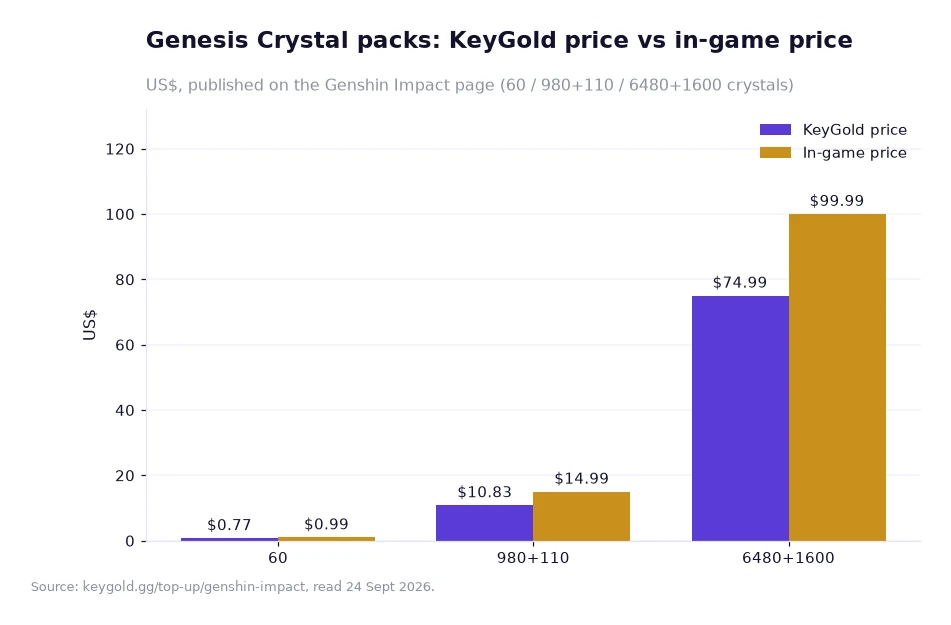
For a refund question the chart has a second use, because it shows how much of your money sits inside one order: at the top rung that is $74.99 paid rather than the $99.99 printed beside it, and at the entry rung it is $0.77. A buyer who would rather keep any single order small can stay on the lower rungs without losing access to the process — the form, the delivery window and the guarantee are the same at every size.
Before you place the order
Confirm three things before paying: the account login is the official one for the game, the server matches your character, and you are logged out of the game itself. Those three cover the overwhelming majority of published failure modes. Then keep the order page open in a second tab, because the Order Record shows the status at any time and the confirmation email marks completion. If something in the form does not accept your details, ask in the live chat before paying rather than after; the chat is staffed by a real person around the clock, and the store's help center explains each field.
Two items on the site are worth reading side by side with this page. The first is the published guarantee itself, quoted above, on the page that lists every pack and its list price — the same page players find when they search for genshin top up. The second is the contact page, which shows how to reach the support team if an order does stall. First-time buyers can also claim the published new-user coupon: 15%, one coupon, no threshold, valid 30 days.
Frequently asked questions
When does the full refund guarantee apply?
The site publishes it in one line: if an order is not delivered or cannot be used, you will receive a full refund, and the Endfield page repeats that the store refunds it in full in the same situations.
What stops an order from failing in the first place?
The published instructions: stay logged out so only one session is active, use the official account login rather than a social sign-in, and check the server, because the four Genshin Impact servers do not share a balance.
Keeping an order on the rails
Treat the guarantee as the floor and the checklist as the plan. Details first, then payment, then hands off the game until the Order Record shows completion. If the order does stall, the published route is the live chat rather than a public post, because account questions are handled there and a one-time code should only ever travel through the order chat. Note also that prices appear in US dollars with a currency selector in the header; if your card bills in another currency your bank may add its own conversion fee, and that charge comes from the bank rather than from the store. Read the delivery window for your game before you start — 5–30 minutes for Genshin Impact, 15–30 minutes for Endfield, usually 10–30 minutes for Whiteout Survival — so that a normal queue does not look like a failure.
The refund wording, delivery windows, account requirements, prices and list prices quoted here come from KeyGold's own pages, read 24 Sept 2026; the differences, percentages and conversion totals are my own arithmetic on those published figures.[1]